
Table of Contents
CFNET-FS 이용한 디지털 출력모듈(CFDO) 사용 방법
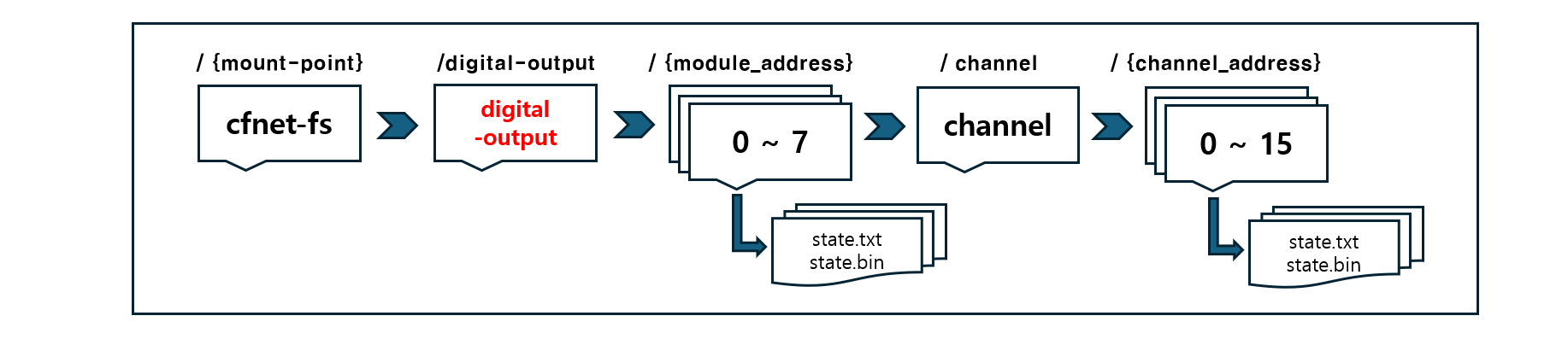
출력 모듈(CFDO)의 제어 파일은 아래에 설명된 /digital-output»{module_address}의 0~7, channel » 0~15 디렉터리의 state 파일(state.bin, state.txt)을 통해 제어됩니다.
☞ “CFNET-FS 개발 환경 구성이 완료되지 않았다면, 아래 링크를 참고하여 먼저 설정을 진행해 주세요.”
0~7 디렉토리{module_address}
module_address의 모듈 주소(0~7)별 디렉터리에는, 16개 채널(포트)을 모두 제어할 수 있는 state.bin 와 state.txt 파일이 포함되어 있습니다.
- 각 디지털 출력모듈(CFDO)은 cfnet-fs 마운트 지점 아래에 있는 디렉터리로 표현됩니다.
{mount-point}/digital-output/{module_address}/
$ tree -L 2 /tmp/cfnet-fs/digital-output/
/tmp/cfnet-fs/digital-output/
├── 0
│   ├── channel
│   ├── state.bin
│   └── state.txt
├── 1
│   ├── channel
│   ├── state.bin
│   └── state.txt
... 7
- 0~7 {module_address} 디렉토리의 state 파일
다음과 같은 2개의 상태 파일이 존재합니다
- state.txt : 16개 채널의 출력 상태를 1과 0으로 구성된 ASCII 문자열 형태로 표현합니다.(각 비트는 하나의 출력 상태를 의미합니다.)
- state.bin : 16개 채널의 출력 상태를 16비트 부호 없는 정수(Unsigned Integer) 형식의 데이터로 표현합니다.
state.txt 또는 state.bin 어느 파일에 쓰기(write) 작업을 하더라도, 디지털 출력 모듈의 출력 상태가 동시에 변경됩니다.
텍스트 파일(.txt)은 사용자 입력·표시에 적합하며, 바이너리 파일(.bin)은 연산 및 논리 처리가 필요한 경우에 적합합니다.
- C#, Python, C에서 코딩 방법
CFNET-FS 파일 시스템을 이용하여 Shell Script, C#, Python, C 언어에서 디지털 출력모듈(CFDO)의 모든 채널(포트)를 제어하는 방법을 보여줍니다.
- “디지털 출력 모듈 Address 0 번의 모든 채널를 on/off 반복 “
/tmp/cfnet-fs/digital-output/0/state.txt/tmp/cfnet-fs/digital-output/0/state.bin
Shell Script
$ echo 1111111111111111 > /tmp/cfnet-fs/digital-output/0/state.txt
$ echo 0000000000000000 > /tmp/cfnet-fs/digital-output/0/state.txt
C#
const string DIGITAL_OUTPUT_0 = "/tmp/cfnet-fs/digital-output/0/state.txt";

while (true)
{
    File.WriteAllText(DIGITAL_OUTPUT_0, "1111111111111111");
    Thread.Sleep(500);
    File.WriteAllText(DIGITAL_OUTPUT_0, "0000000000000000 ");
    Thread.Sleep(500);
}
const string DIGITAL_OUTPUT_0 = "/tmp/cfnet-fs/digital-output/0/state.bin";

while (true)
{
    File.WriteAllBytes(DIGITAL_OUTPUT_0, [0xFF, 0xFF]);
    Thread.Sleep(500);
    File.WriteAllBytes(DIGITAL_OUTPUT_0, [0x00, 0x00]);
    Thread.Sleep(500);
}
Python
import time

DIGITAL_OUTPUT_0 = "/tmp/cfnet-fs/digital-output/0/state.txt"

while True:
    open(DIGITAL_OUTPUT_0 , "w").write("1111111111111111")
    time.sleep(0.5)

    open(DIGITAL_OUTPUT_0 , "w").write("0000000000000000")
    time.sleep(0.5)
import time

DIGITAL_OUTPUT_0 = "/tmp/cfnet-fs/digital-output/0/state.bin"

while True:
    open(DIGITAL_OUTPUT_0 , "w").write(b'\xFF\xFF')
    time.sleep(0.5)

    open(DIGITAL_OUTPUT_0 , "w").write(b'\x00\x00')
    time.sleep(0.5)
C
#include <stdio.h>
#include <unistd.h>

#define PATH_DIGITAL_OUTPUT_0 "/tmp/cfnet-fs/digital-output/0/state.txt"

static void write_text(const char *path, const char *str)
{
    FILE *f = fopen(path, "w");
    fputs(str, f);
    fclose(f);
}

int main(void)
{
    while (1) {
        write_text(PATH_DIGITAL_OUTPUT_0, "1111111111111111");
        usleep(500000);
        write_text(PATH_DIGITAL_OUTPUT_0, "0000000000000000");
        usleep(500000);
    }
}
#include <stdio.h>
#include <unistd.h>

#define PATH_DIGITAL_OUTPUT_0 "/tmp/cfnet-fs/digital-output/0/state.bin"

static void write_bytes(const char *path, const unsigned char *data, int size)
{
    FILE *f = fopen(path, "wb");
    fwrite(data, 1, size, f);
    fclose(f);
}

int main(void)
{
    while (1) {
        write_bytes(PATH_DIGITAL_OUTPUT_0, (unsigned char[]){255, 255}, 2);
        usleep(500000);
        write_bytes(PATH_DIGITAL_OUTPUT_0, (unsigned char[]){0, 0}, 2);
        usleep(500000);
    }
}
channel » 0~15(채널) 디렉터리
channel 하위 디렉터리 0~15에는 각각의 개별 채널(포트 0~15)에 대응되는 state.bin과 state.txt 파일이 있으며, 이 파일들을 통해 각 채널을 개별적으로 제어할 수 있습니다.
- 각 디지털 출력 채널은 cfnet-fs 마운트 경로 아래에서 디렉터리 형태로 제공됩니다.
{mount-point}/digital-output/{module_address}/channel/{channel_address}/
$ tree /tmp/cfnet-fs/digital-output/0/
/tmp/cfnet-fs/digital-output/0/
├── channel
│   ├── 0
│   │   ├── state.bin
│   │   └── state.txt
│   ├── 1
│   │   ├── state.bin
│   │   └── state.txt
│   ... 15
- 0~7(channel) 디렉터리의 state 파일
각 디지털 출력 채널에는 두 가지 상태 파일이 제공됩니다.
- state.txt : 디지털 출력 채널의 상태를 ASCII 문자 1 또는 0으로 표시합니다.
- state.bin 디지털 출력 채널의 상태를 단일 이진 바이트로 표시합니다.(0 : OFF , 1 : ON)
두 상태 파일 중 어느 하나에 값을 쓰면, 해당 디지털 출력 채널(포트)의 상태가 변경됩니다.
state.txt 파일은 셸 스크립트 등에서 사용자가 직접 값을 입력하거나 상태를 확인할 때 편리하며, state.bin 파일은 수학적·논리적 연산 등 추가 처리가 필요한 경우에 보다 효율적으로 사용할 수 있습니다.
- C#, Python, C에서 코딩 방법
CFNET-FS 파일 시스템을 이용하여 Shell Script, C#, Python, C 언어에서 디지털 출력모듈(CFDO)의 특정 채널(포트)를 제어하는 방법을 보여줍니다.
- “디지털 출력 모듈 Address 0 번의 모든 3채널를 on/off 반복”
tmp/cfnet-fs/digital-output/0/channel/3/state.txttmp/cfnet-fs/digital-output/0/channel/3/state.bin
Shell Script
$ echo 1 > /tmp/cfnet-fs/digital-output/0/channel/3/state.txt
$ echo 0 > /tmp/cfnet-fs/digital-output/0/channel/3/state.txt
C#
const string DIGITAL_OUTPUT_0_CHANNEL_3 = "/tmp/cfnet-fs/digital-output/0/channel/3/state.txt";

while (true)
{
    File.WriteAllText(DIGITAL_OUTPUT_0_CHANNEL_3 , "1");
    Thread.Sleep(500);

    File.WriteAllText(DIGITAL_OUTPUT_0_CHANNEL_3 , "0");
    Thread.Sleep(500);
}
const string DIGITAL_OUTPUT_0_CHANNEL_3 = "/tmp/cfnet-fs/digital-output/0/channel/3/state.bin";

while (true)
{
    File.WriteAllBytes(DIGITAL_OUTPUT_0_CHANNEL_3 , [ 1 ]);
    Thread.Sleep(500);

    File.WriteAllBytes(DIGITAL_OUTPUT_0_CHANNEL_3 , [ 0 ]);
    Thread.Sleep(500);
}
Python
import time

DIGITAL_OUTPUT_0_CHANNEL_3 = "/tmp/cfnet-fs/digital-output/0/channel/3/state.txt"

while True:
    open(DIGITAL_OUTPUT_0_CHANNEL_3 , "w").write("1")
    time.sleep(0.5)

    open(DIGITAL_OUTPUT_0_CHANNEL_3 , "w").write("0")
    time.sleep(0.5)
import time

DIGITAL_OUTPUT_0_CHANNEL_3 = "/tmp/cfnet-fs/digital-output/0/channel/3/state.bin"

while True:
    open(DIGITAL_OUTPUT_0_CHANNEL_3 , "wb").write(b'\x01')
    time.sleep(0.5)

    open(DIGITAL_OUTPUT_0_CHANNEL_3 , "wb").write(b'\x00')
    time.sleep(0.5)
C
#include <stdio.h>
#include <unistd.h>

#define DIGITAL_OUTPUT_0_CHANNEL_3 "/tmp/cfnet-fs/digital-output/0/channel/3/state.txt"

static void write_text(const char *path, const char *str)
{
    FILE *f = fopen(path, "w");
    fputs(str, f);
    fclose(f);
}

int main(void)
{
    while (1) {
        write_text(DIGITAL_OUTPUT_0_CHANNEL_3 , "1");
        usleep(500000);
        write_text(DIGITAL_OUTPUT_0_CHANNEL_3 , "0");
        usleep(500000);
    }
}
#include <stdio.h>
#include <unistd.h>

#define DIGITAL_OUTPUT_0_CHANNEL_3 "/tmp/cfnet-fs/digital-output/0/channel/3/state.bin"

static void write_byte(const char *path, unsigned char value)
{
    FILE *f = fopen(path, "wb");
    fwrite(&value, 1, 1, f);
    fclose(f);
}

int main(void)
{
    while (1) {
        write_byte(DIGITAL_OUTPUT_0_CHANNEL_3 , 1);     // or 255, any non-zero value
        usleep(500000);
        write_byte(DIGITAL_OUTPUT_0_CHANNEL_3 , 0);
        usleep(500000);
    }
}