
This is an old revision of the document!
Table of Contents
.NET (C# & VB.NET)
This page applies to COMFILE Technology's Linux platforms, including ComfilePi, Raspberry Pi, jPC, and other Linux-based devices.
You can develop C# and VB.NET applications on Linux using Microsoft .NET.
Windows WinForms applications can also run on Linux using either ComfileTech.WinForms or Mono.
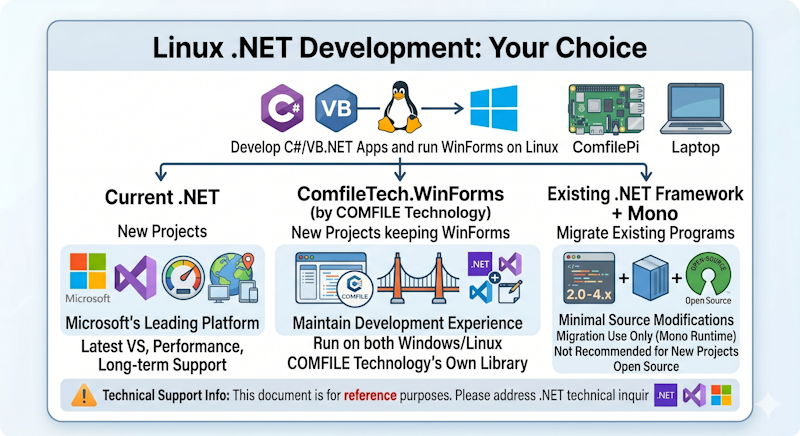
Which Option Should I Choose?
| Scenario | Recommended Option |
|---|---|
| Starting a new project | .NET 5+ (Recommended) |
| Want to continue using WinForms with modern .NET | ComfileTech.WinForms |
| Porting an existing .NET Framework application to Linux | Mono |
Modern .NET (.NET 5+)
Modern .NET is Microsoft's current development platform and is recommended for most new projects.
Benefits include:
- Active development and support from Microsoft
- Latest C# language features
- Improved performance
- Long-term platform support
- Cross-platform compatibility
Supported platforms include:
- Windows
- Linux
- Android
- macOS
- iOS
- Web Browser
For user interface development, consider one of the following frameworks:
For more information:
ComfileTech.WinForms
ComfileTech.WinForms allows traditional WinForms applications to run on both Windows and Linux while using modern .NET.
This is often the easiest migration path for developers who are already familiar with WinForms and want to continue using the Visual Studio designer.
For more information:
.NET Framework 4 and Mono
Mono allows existing .NET Framework applications to run on Linux. This option is useful when:
- You already have an existing .NET Framework 2.0–4.x application
- You want to minimize code changes
- Your team is heavily invested in WinForms
While Mono remains a practical solution for existing applications, it is generally not recommended for new projects.
For more information:
Sharing Code Between .NET and .NET Framework
If you need a library that works with both .NET Framework 4.x and modern .NET, consider targeting .NET Standard 2.0.
This approach is particularly useful for reusable libraries such as:
- Modbus communication
- GPIO access
- I2C communication
- Serial communication
- TCP/IP communication
- Other utility libraries
Technical Support Policy
COMFILE Technology does not provide technical support for Visual Studio, C#, VB.NET, or Microsoft .NET technologies.
For support related to Microsoft products, please contact Microsoft directly.
====== .NET (C# & VB.Net) ====== The .NET ecosystem has bifurcated into two flavors: * “.NET Framework” now refers to the .NET Framework as it was up until and including version 4. * “.NET” now refers to the .NET Framework version 5 and later (previously called “.NET Core”), currently at .NET 10. WinForms applications can be run on Linux panel PCs like the ComfilePi using one of the following configurations: - Using .NET Framework 4, with the application running on the Mono runtime. - Using .NET 5+ and a .NET port of Mono WinForms like our ComfileTech.WinForms library. In general, it is recommended to use the latest version of .NET unless you have a compelling reason not to. ===== When to Choose .NET 5+ ===== Using .NET on the ComfilePi You might choose to use .NET under the following scenarios: * You are embarking on development of a new solution, and * Your .NET developers are willing to adopt a cross-platform UI framework that supports Linux like the following: * Blazor * Avalonia * Uno Platform * Eto.Forms * Gir.Core * There are many others * Or, you can use a .NET port of Mono WinForms like our ComfileTech.WinForms library. * If you would prefer WinForms with a more modern appearance, consider our jControls library. One of the best ways to make your application portable across all platforms is to use Blazor. If you can isolate your UI into a single .NET assembly, you can not only display your UI remotely in a web browser, but you can also host your UI in a WebView on any platform using Blazor Hybrid. For Blazor Hybrid applications on Linux, consider using the open-source BlazorWebView. NOTE: Maui does not currently support Linux. ==== Advantages ==== * It is being actively maintained and developed by Microsoft. * New features, tooling enhancements, and performance benefits are being released every year. * Code targeting .NET can be natively compiled, providing performance benefits as well as protection against code disassembly. * Code targeting .NET an be used to make libraries that can be consumed by other languages like C, Python, and many others. * .NET has the broadest platform support, IF you can decided on a cross-platform UI framework. .NET supports the following platforms * Windows * Linux * Android * MacOS * iOS * Web Browser ==== Disadvantages ==== * If using WinForms, it requires a .NET port of Mono WinForms to run on Linux. * If using a cross-platform UI framework, it may not be possible to use a WYSIWYG UI designer like that provided by WinForms in Visual Studio. * Requires a.NET port of Mono WinForms to run WinForms programs on Linux. ===== When to Choose .NET Framework 4 ===== Using .NET Framework on the ComfilePi You might choose to use the .NET Framework 4 under the following scenarios: * You have an existing .NET Framework 2.0 ~ 4.x application that you need to port to Linux * Your .NET developers are not familiar with any cross-platform UI frameworks (e.g. Blazor, Avalonia, Uno Platform, etc.), and are only familiar WinForms. ==== Advantages ==== * Works on both Windows (natively) and Linux (via Mono) * For developers already familiar with Winforms, it does not require learning a new UI framework. ==== Disadvantages ==== * Although the .NET Framework 4 is being maintained by Microsoft, and Mono is currently being maintained by the Wine project developers, they are not being further developed, and will inevitably be deprecated in the future. * The Mono implementation on Linux, while being a remarkable engineering achievement, is not perfect, and may require some workarounds. * Code targeting the .NET Framework 4 can only be run on Windows, and platforms with a functioning Mono runtime. * Code targeting the .NET Framework 4 cannot be compiled to machine code, and can be easily disassembled. ===== Targeting Both .NET 5+ and .NET Framework 4 ===== If you need to develop a library for use in both the .NET Framework 4 and .NET 5+, use .NET Standard 2.0. Note that by targeting .NET Standard, you will likely be limited to just creating utility libraries (e.g. Modbus communication, GPIO, I2C, Serial Communication, TCP/IP communication, etc.), but that can still be very helpful in maximizing your solution's portability. ===== Technical Support Policy ===== COMFILE Technology does not provide technical support for Visual Studio and .NET Technologies. Please contact Microsoft directly for support for their products and technologies.