Adding the Library
To develop Python applications for CFNET I/O expansion modules on the Modular Pi, you must use the CFRASP.py module (library) file.
[Download Modular Pi Python Library (CFRASP.py)]
1. Download the CFRASP.py file and save it in the folder where your Modular Pi program will execute. If your SSH Remote environment is configured, you can transfer the file from your development PC to the Raspberry Pi as shown below:
- > > scp [SourceFilePath] [Username]@[RaspberryPi_IP]:[DestinationFolderPath]
- e.g.: scp C:\Users\pc\Desktop\CFRASP.py admin@192.168.0.6:/home/pi/

2. Create a new Python file for your program. The new file and the CFRASP.py file must be located in the same folder.
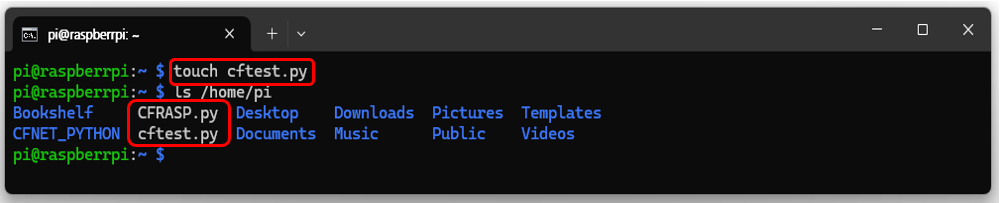
3. Add the statement `from CFRASP import CFNET` at the very top of your new Python file, followed by `cfnet = CFNET()`. You are now ready to use the CFNET I/O modules.
from CFRASP import CFNET
cfnet = CFNET()
Example
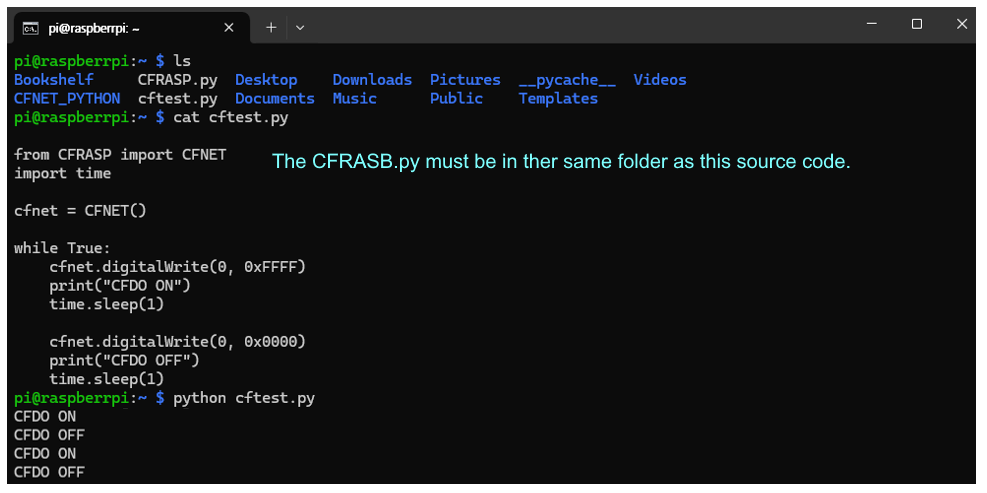
The following example shows source code that toggles a CFDO-16N output module (Address 0) ON and OFF every second.
from CFRASP import CFNET    # Must be in the same folder as CFRASP.py
import time

cfnet = CFNET()             # Create CFNET object (Scans and initializes CFMODULES)

while True:
    cfnet.digitalWrite(0, 0xFFFF)
    print("CFDO ON")
    time.sleep(1)

    cfnet.digitalWrite(0, 0x0000)
    print("CFDO OFF")
    time.sleep(1)
The following shows the execution of the file created using the example program.