Table of Contents
Internal Variables and Expressions
Internal Variables
In the ComfileHMI, a Internal variable refers to a named location in the ComfileHMI hardware's memory.
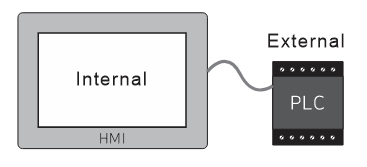
If a Internal variable is used without first being declared, it will be implicitly declared and available for use immediately.
- All variables are global, so they must be given unique names, and can be used on any screen.
- Variables can only store numeric values. Integers, floating point, and even 64-bit integers are supported).
- Variables names are case-sensitive and support Unicode, so variable names can be expressed in any language.
- Variable names cannot begin with numeric digits; they must begin with a letter or an underscore character. Variables names should not contain spaces.
- A good example for a motor status variable could be Motor1
- 123abc is invalid because it begins with a numeric digit
- Motor Status is invalid because it contains a space
A list of variables in use can be obtained from Comfile Studio's main menu: Project→View Addresses and Variables in Use.
String Variables
String variables were added in a subsequent version of Comfile Studio. They are declared and used with a $ prefix. For example <html>
$a="hello"
</html>.
Internal Memory
Internal memory is a specific memory region in the ComfileHMI hardware. It is volatile, so it will be erased when the ComfileHMI hardware is powered off.
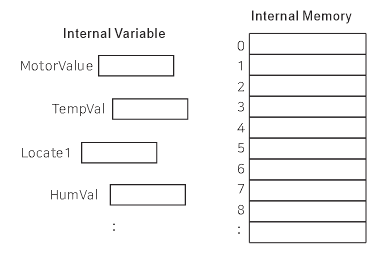
There are 1024 memory locations (indexed 0~1023) that can be written to and read from. They can store 64-bit integers and double-precision floating point values.
set_mem(index, value): Writesvalueto internal memory atindex.mem(index): Reads the value current stored in internal memory atindex.
Multiple values can be stored adjacently in internal memory by passing multiple value arguments to the set_mem function.
set_mem(index, value1, value2, …, valueN)
See the internal memory functions.
Conditional Expressions
Conditional expressions provide the ability to compare variables.
<, <html>
<=
</html>, ==, >=, >, != operators are supported. They are identical to the comparison operators used in the C programming language.
&& and || are boolean AND and boolean OR operators respectively.
(Example)
MotorStatus > 1
Heater1 == 0 ⇐ true if Heater1 is equal to 0
Heater1 != 0 ⇐ true if Heater1 does not equal 0
Mathematical Expressions
+, -, *, /, and % operators are supported for performing math on variables. They are identical to the arithmetic operators used in the C programming language.
(Example)
MotorStatus + 1
Bitwise Expressions
<html>
>>
</html>, <html>
<<
</html>, |, and & operators are supported for bitwise operations. They are identical to the bitwise operators used in the C programming language.
(Example)
<html>
(bits >> 2) & 1
</html>